
AI agents for small business: where they work and fail
AI agents can remove real work from a small business, but only when the task has a clear finish line, usable data, limited permissions, and a person who owns the exceptions.
AI agents for small business are being sold as digital employees that research, decide, update systems, and follow up without supervision.
That description is just accurate enough to be expensive.
An AI agent can take a goal, choose from available tools, perform several steps, and adjust based on what happens. That is genuinely different from a fixed automation. It is also exactly why agents need tighter boundaries than normal software: the path is not fully predetermined.
The right first question is not, “Which agent platform should we buy?”
It is: Which piece of work has a clear finish line, low-cost mistakes, and enough structure for an agent to operate safely?
Most small businesses have one. Very few should start by giving it access to everything.
Agent, workflow, or chatbot?
These terms are often mixed together, so separate them before buying anything.
A chatbot responds to a message. It may answer from a knowledge base, collect information, or route a request.
A workflow follows predefined steps. When a form arrives, create a contact, alert the owner, and send an acknowledgment. The path is known in advance.
An agent chooses some of its own steps. It may decide which records to inspect, which tool to call, whether it has enough information, and how to produce the requested result.
Use the least flexible system that can do the job.
If the steps are stable, a normal workflow is cheaper, faster, and easier to debug. Adding an agent to “make it intelligent” often turns a reliable process into a probabilistic one for no benefit.
An agent earns its place when the work requires interpretation across several steps: reading an inquiry, checking context in the CRM, finding missing details, drafting a recommendation, and routing it differently based on what it found.
Where AI agents work well
Anthropic's guidance on effective agents makes a useful distinction: start with the simplest solution, then add agentic behavior only when it improves the outcome. OpenAI's practical guidance similarly centers agents on workflows where rules become difficult to maintain, decisions depend on unstructured information, or the work requires several tools.
For a small service business, good candidates share five traits.
1. The task has a clear finish line
“Improve our operations” is not a task.
“Review every open deal with no activity in 21 days, summarize the latest interaction, and draft the next action for approval” is a task. You can inspect the output and decide whether it is complete.
2. The agent can read the required context
An agent cannot compensate for missing records. If call notes live in personal notebooks and deal status lives in someone's memory, the agent will produce confident work from partial information.
Clean inputs matter more than a clever model.
3. Mistakes are reversible
Drafting a follow-up for review is reversible. Issuing a refund is not. Tagging a record incorrectly is fixable. Deleting the record may not be.
Start where a bad output costs minutes, not customers.
4. Volume justifies the setup
An agent that saves five minutes once a month is a demo. One that removes fifteen minutes from a task performed fifty times a week may be a system.
Count the work before automating it.
5. One person owns the exceptions
Every agent eventually encounters missing data, conflicting instructions, unavailable tools, or a case outside policy. “The team” cannot own those exceptions. Name one person and define the escalation channel.
Where agents fail
The failures are usually not dramatic. They are quiet, plausible, and repeated.
Vague goals produce plausible busywork
Tell an agent to “nurture cold leads” and it may create activity without progress. A useful objective needs a target state, constraints, and a stop condition.
Better: “For leads marked qualified with no reply in seven days, draft one message that references the last conversation. Do not send it. Skip records with an active support issue.”
Too many permissions multiply the damage
An agent that can read a CRM, send email, edit invoices, and delete files has a large blast radius. Convenience is not a security model.
Give it only the tools required for one workflow. Separate read access from write access. Put consequential actions behind approval.
Bad process gets automated faster
If two people disagree about when a lead is qualified, an agent will not resolve the policy problem. It will apply one inconsistent interpretation at scale.
Write the operating rule first. This is the same principle behind small business automation: automate information transfer before judgment.
Edge cases overwhelm the happy path
A demo uses clean sample data. Real work includes duplicate contacts, sarcastic emails, missing attachments, old prices, clients with exceptions, and tools that time out.
The build is not complete when the happy path works. It is complete when the system knows when to stop and ask.
Nobody evaluates the output
Teams often check ten examples, declare success, and let the agent run indefinitely. Performance then drifts as offers, data, staff, and customer behavior change.
Keep a set of representative cases. Re-run them when instructions, models, tools, or policies change. Track corrections and escalations in production.
The first agent workflow I would try
For many service businesses, the safest useful starting point is a pipeline review agent.
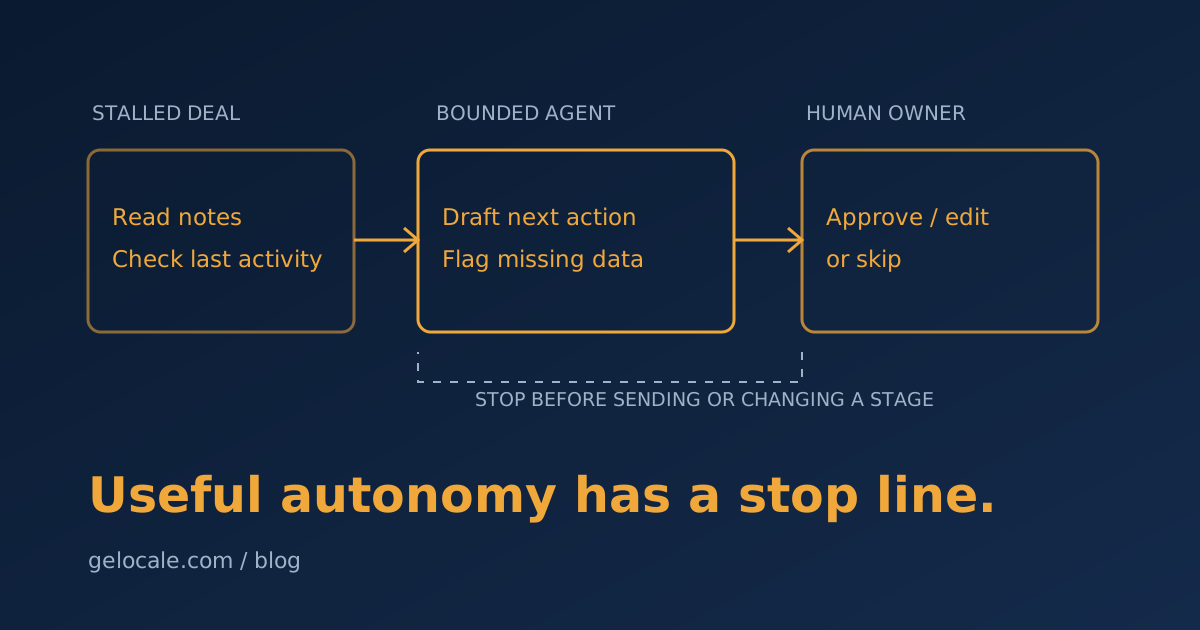
It does not send messages or change deal stages. It prepares a daily decision queue.
Inputs
- Open opportunities in the CRM.
- Last activity date.
- Recent email or call notes.
- Current stage and owner.
- A written definition of “stalled.”
Agent task
For each deal that meets the stalled rule:
- Summarize the last meaningful interaction.
- Identify the likely blocker using only available evidence.
- Recommend one next action.
- Draft a short follow-up if appropriate.
- Flag missing or conflicting information.
Output
A review table with the deal, evidence, recommendation, draft, and an approve/edit/skip action.
Why this is a good first workflow
The work is repetitive but requires reading unstructured notes. The finish line is clear. The output is useful before any write action occurs. A person keeps authority over communication and pipeline changes.
It also exposes a business problem quickly: if the agent cannot tell what happened, your CRM probably cannot either. That is valuable diagnostic information, not an AI failure. See why CRM pipeline data drifts from reality for the cleanup rules that help.
Build the control layer before autonomy
Before turning on the workflow, define six controls.
Scope
Which records can it access? Which customers, pipelines, or date ranges are excluded?
Allowed actions
List exact tools and permissions. “CRM access” is too broad. “Read opportunities and create draft notes” is testable.
Approval points
Require a person before sending external communication, moving money, changing legal or commercial terms, deleting data, or making a decision that is difficult to reverse.
Stop conditions
The agent should stop when required information is missing, sources conflict, confidence is low, a tool fails, or the case matches a defined exception.
Audit trail
Keep the input, tool actions, output, approval decision, and final result. Without a record, you cannot diagnose a bad outcome.
Owner and review date
Name the operator responsible for exceptions and schedule a review. An agent without an owner is unattended software with credentials.
A 30-day pilot
Week 1: choose and document
Watch the task happen manually ten times. Write the goal, inputs, decision rules, exceptions, and finish line. Calculate current minutes per case and error rate.
Week 2: build in read-only mode
Let the agent inspect records and produce recommendations without changing anything. Compare its work with a human's work using the same cases.
Week 3: add one controlled write action
Allow a low-risk action such as creating a draft note. Keep communication and stage changes behind approval. Log every correction.
Week 4: decide with numbers
Measure:
- Minutes saved per completed case.
- Percentage approved without edits.
- Percentage escalated correctly.
- Errors caught before action.
- Errors that reached a customer or system.
If the agent saves time but requires constant checking, narrow the scope. If it performs well on routine cases, keep the exceptions human. Do not expand permissions just because the pilot feels exciting.
The useful version is usually less autonomous
Small businesses do not need digital employees wandering through the stack. They need bounded systems that remove repeatable work without hiding risk.
The best first agent may read widely, reason over several steps, and still stop before it acts. That is not a failure of autonomy. It is good operations design.
If you want help choosing a first workflow and drawing the approval boundaries, a Growth Systems Review is a practical place to start. We will map the current task, quantify the repetition, and decide whether it needs an agent, a normal automation, or a process fix.