
AI workflow automation: a practical build-vs-buy guide
AI workflow automation should remove a measurable bottleneck, not add another platform. Use this decision framework to choose a packaged tool, configured workflow, or custom build.
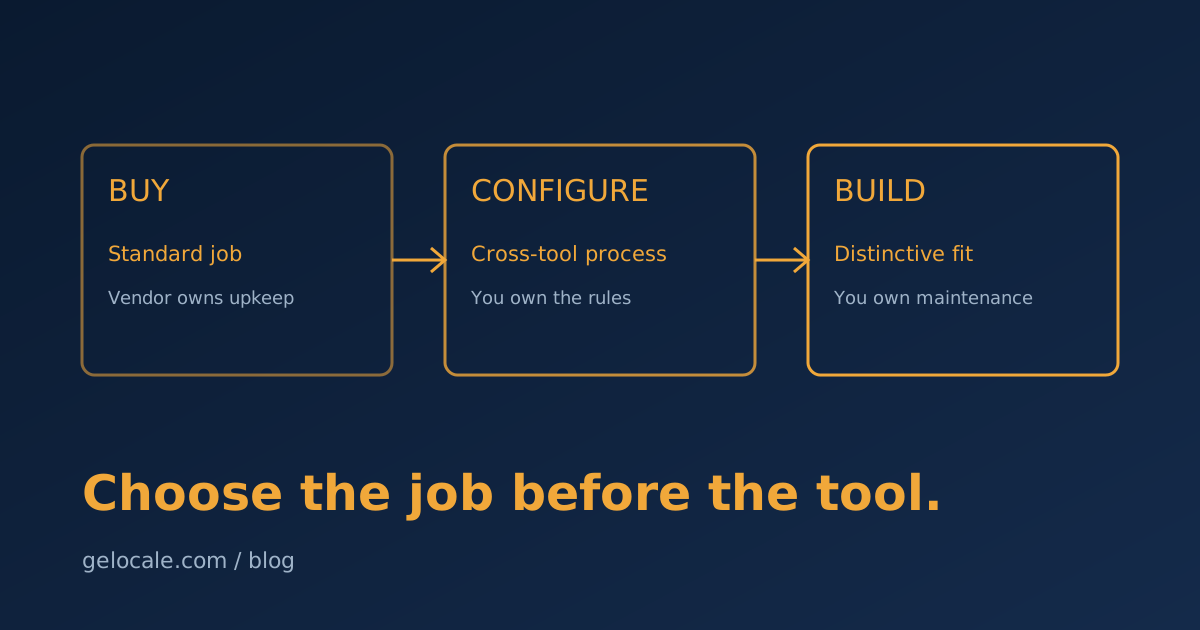
AI workflow automation has made the build-versus-buy decision harder, not easier.
A packaged tool can now summarize, classify, draft, and route work out of the box. An automation platform can add AI to the systems you already use. A custom application can combine models, business rules, and internal data into one workflow.
All three can work.
The expensive mistake is choosing based on the most impressive demo instead of the workflow you need to improve.
For a service team, the decision should come down to six things: how standard the process is, where the data lives, how much judgment is involved, what a mistake costs, how often the workflow changes, and whether the result creates a real advantage.
Start there. The tool category comes later.
First, define the unit of work
“Automate client onboarding” is too large.
A real unit of work looks like this:
When a signed agreement appears, verify the required fields, create the client workspace, draft the welcome email from the chosen service package, assign internal owners, and flag any missing information before kickoff.
That statement gives you:
- A trigger.
- Required inputs.
- Actions.
- A decision point.
- An exception path.
- A finish line.
If you cannot describe the workflow at that level, you are not ready to compare software. You are comparing interfaces without knowing the job.
Run the process manually and write down the variations. Count how often it happens, how long it takes, and which mistakes matter. As the 30-minute operations audit explains, the best automation candidates usually become obvious once you trace the real handoffs instead of the documented ones.
The three choices
Buy a packaged AI tool
This is software built around a recognizable job: meeting notes, support triage, proposal drafting, document extraction, or sales call analysis.
The vendor owns the interface, core workflow, model choices, hosting, and most maintenance.
Configure an automation platform
This connects existing systems using triggers, actions, rules, and AI steps. The workflow may run in Make, Zapier, n8n, a CRM automation builder, or a similar platform.
You own the process design. The platform owns much of the infrastructure.
Build a custom workflow
This is code designed around your data, permissions, rules, interface, and measurement. It may still use commercial models and APIs. “Custom” does not mean rebuilding everything from scratch.
You own more control and more maintenance.
There is also a common fourth answer: do not automate yet. A process that changes every week or relies on an unwritten policy will not become stable because AI is added to it.
When buying is the right answer
Buy when the process is common, the differentiator is execution rather than software, and a mature product covers most of the requirement.
Good signs:
- Many businesses perform the task in roughly the same way.
- Standard integrations cover your source systems.
- The data is not unusually sensitive or restricted.
- The vendor provides usable permissions, logs, exports, and support.
- Your team can adapt to the product's workflow without harming the client experience.
- Time-to-value matters more than precise control.
Meeting transcription is the obvious example. Most small businesses should not build transcription infrastructure. They should buy a product, configure retention and access correctly, and spend their effort on what happens after the notes arrive.
Packaged tools fail when the polished demo hides rigid assumptions. Test with your worst real examples, not the vendor's sample.
Ask:
- Can we export our data in a useful format?
- Can we see why a result was produced?
- Can we control who can approve or publish it?
- What happens when the integration fails?
- Are model usage and overage costs visible?
- Can we disable training or set retention to match our policy?
If the answer to basic control questions is vague, the product is not operationally ready for your team.
When configuration is the right answer
Configure an automation platform when the workflow is specific to your business but can be expressed as understandable steps across existing tools.
This is the best default for many service operations:
- Classify an inquiry.
- Enrich the CRM record.
- Draft a response.
- Route it based on service and urgency.
- Ask for approval.
- Send it through the existing email system.
- Record the result.
The AI step handles language or interpretation. Deterministic workflow steps handle movement, permissions, timing, and logging.
That separation matters. Let AI classify the request, but let a fixed rule decide which queue receives a high-risk category. Let AI draft the message, but let the mail system send only after approval.
Configuration is attractive because it is fast to change and visible to operators. It becomes fragile when the flow grows into dozens of branches, duplicated logic, hidden dependencies, and transformations nobody understands.
If every change requires touching six scenarios and hoping they remain synchronized, you have crossed from configuration into accidental software development.
When a custom build is justified
Build when the workflow is strategically important and the requirement cannot be met safely or efficiently by adapting an existing product.
Strong signals:
Your data model is the product
The workflow depends on relationships or history that packaged tools do not understand: custom service entitlements, multi-step approvals, proprietary scoring, or records spread across several systems.
The interface needs to fit the work
Operators need one review queue that combines evidence, recommendations, approvals, and exceptions. Forcing them to jump between five tabs removes the time the automation was meant to save.
Permissions and auditability are non-negotiable
You need precise access rules, customer-level isolation, regional controls, or a complete trail of model inputs, tool calls, approvals, and outcomes.
The logic creates an advantage
The workflow encodes how you deliver better service, price risk, allocate capacity, or respond faster than competitors. Adapting your process to a generic tool may erase the advantage you are trying to systematize.
Volume changes the economics
Per-seat or per-task pricing can become more expensive than a focused internal tool at sufficient volume. Include hosting, monitoring, maintenance, model usage, and staff time in the custom cost. Code is not the whole bill.
Custom is not justified because your process has unusual field names. It is justified when control, fit, economics, or differentiation matter enough to own the system.
Use a weighted decision, not a debate
Score each option from 1 to 5 across the criteria below.
| Criterion | Weight | What to ask |
|---|---|---|
| Functional fit | 25% | Does it handle the real workflow and exceptions? |
| Time to value | 15% | How quickly can the team use it safely? |
| Three-year cost | 15% | What are licenses, usage, build, and maintenance? |
| Integration fit | 15% | Can it use the systems and data we already trust? |
| Control and risk | 20% | Are permissions, approvals, retention, and logs sufficient? |
| Adaptability | 10% | Can we change the process without rebuilding everything? |
Multiply each score by its weight. More importantly, write one sentence explaining every score. The explanation exposes assumptions that a spreadsheet alone can hide.
Reject any option that fails a hard requirement even if its total score is high. A cheap tool that cannot meet a data residency or approval requirement is not a bargain.
The architecture that works most often
For service teams, the practical answer is usually hybrid:
- Keep the CRM, help desk, accounting system, and file storage as systems of record.
- Use an automation layer to move events and enforce the workflow.
- Use AI for narrow interpretation or drafting tasks.
- Put consequential actions behind explicit rules or human approval.
- Add a small custom interface only where existing tools make review difficult.
This avoids two extremes: buying a separate AI product for every task, or funding a large custom platform before proving the workflow.
The architecture follows the rule from a growth system is not a tool stack: define the operating contract first, then choose the plumbing that enforces it.
Risk controls every option needs
Whether you buy, configure, or build, require:
- Minimum permissions: the workflow can access only the data and actions it needs.
- Approval gates: people retain authority over money, legal terms, external commitments, deletions, and sensitive decisions.
- Failure visibility: errors create an alert and a recoverable queue, not silent data loss.
- Audit history: retain inputs, outputs, actions, approvals, and final state where appropriate.
- Evaluation cases: test routine work, edge cases, and known failures before each material change.
- Cost limits: set usage budgets and alerts before a loop or volume spike becomes a bill.
- An exit path: know how to export data and continue the process if the product or model changes.
Microsoft's recent workflow tooling emphasizes approvals, versioning, node-level testing, and permission boundaries. Those are not enterprise decorations. They are the control layer that makes AI automation usable in real operations.
A four-week proof before a major commitment
Week 1: baseline
Choose one workflow. Record volume, cycle time, rework, error rate, and owner. Document the top five exceptions.
Week 2: cheapest credible prototype
Use the fastest option that can test the risky assumption. That might be a packaged trial, an automation-platform flow, or a thin custom review screen. Keep irreversible actions disabled.
Week 3: controlled production
Run a limited share of real work through it. Compare outputs with the existing process. Track human edits, false confidence, failures, and time spent supervising.
Week 4: decide
Continue only if the workflow improves a measurable result:
- Less handling time.
- Shorter customer response time.
- Fewer missed handoffs.
- Lower rework.
- Better data completeness.
- More capacity without lower service quality.
Do not count generated summaries or completed AI steps as outcomes. Count the operational change.
Buy speed, configure the process, build the advantage
That is the simplest version of the framework.
Buy the common capability. Configure the workflow that reflects how your team operates. Build only the part where fit, control, economics, or differentiation justify ownership.
If you are deciding between three tools and a custom build, a Growth Systems Review can make the comparison concrete. We will map the workflow, put numbers on the bottleneck, and identify the cheapest option that can prove the result without locking you into the wrong architecture.