
Client offboarding checklist for service businesses
Copy a client offboarding checklist for final approval, file handover, billing, access removal, and retention. Includes a close-out email and worked example.
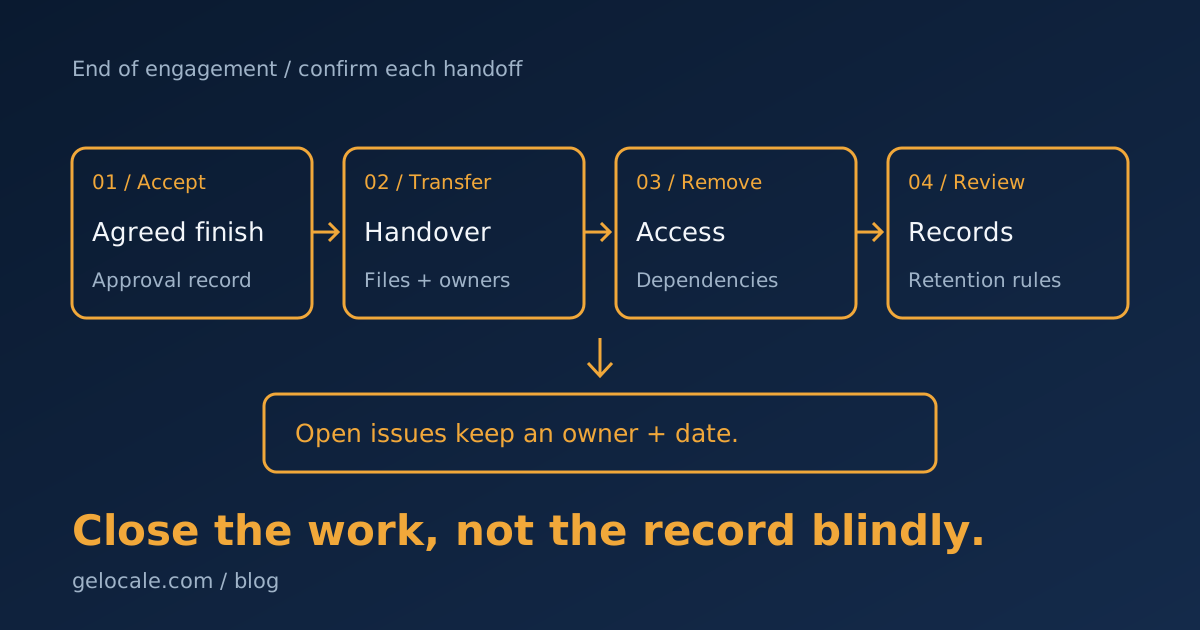
A client offboarding checklist gives your engagement a clear finish. Confirm acceptance, transfer the agreed files, settle open commercial items, and review access and retention.
Give each action an owner, due date, and completion record. A project marked “closed” does not prove the client received everything.
This checklist covers service engagements ending normally or by agreement. A dispute, security incident, or regulated matter needs its own decision-maker and process.
A client offboarding checklist you can copy
Adapt this client offboarding checklist template to your contract and service. Keep unresolved items visible instead of forcing every task into “complete.”
- Confirm the end date, agreed deliverables, and client approval contact.
- Record acceptance, outstanding revisions, and any agreed exclusions.
- Transfer the agreed files, instructions, and asset ownership.
- Confirm the client or replacement provider can access the handover.
- Check final invoices, credits, expenses, subscriptions, and payment status.
- Stop project-specific reminders and scheduled work that should end.
- Review accounts, permissions, integrations, and access removal.
- Assign retention, deletion, and any legal-hold decisions to an authorized owner.
- Send a close-out note with the support boundary and remaining actions.
- Record who owns every exception before closing the project.
Use statuses such as waiting, ready for review, blocked, and complete. Save the evidence beside the task.
Suitable evidence might be written acceptance, a confirmed file transfer, or a record of removed permissions. An unchecked assumption is not evidence.
Choose one offboarding owner to coordinate the sequence. Finance, delivery, and system administrators still approve the decisions within their roles.
Confirm the end before closing the work
Start from the agreement rather than the last meeting. Confirm whether the engagement ended, paused, or moved into an ongoing support arrangement.
List the deliverables and compare them with their acceptance criteria. Separate completed work from revisions still owed.
Silence is not acceptance unless your agreement and applicable rules support that treatment. Record what the client approved and when.
If an item is disputed, leave it open with an owner and next review date. Do not label the project fully complete to simplify reporting.
An ongoing support plan also needs a handoff. Record its owner, start date, included work, and where the client should send requests.
The client onboarding checklist covers the start of delivery. Offboarding checks what must end or transfer.
Transfer usable files and ownership
Prepare an inventory of the files, accounts, and instructions promised in the agreement. Note the intended recipient and transfer method.
Test access with the recipient rather than relying on a sent email. A folder link may still point to an account your team will remove.
Distinguish an exported file from ownership of the live system. A website backup does not transfer a domain, hosting account, or connected billing.
Agree who will own subscriptions and renewals after handover. Record any platform limits that affect transfer before promising completion.
Use approved permission and transfer controls. Do not put passwords, access tokens, or confidential records into the close-out email.
Keep the handover narrow enough to use. A short index naming the final files and their purpose helps the recipient find the right output.
Keep billing and delivery status separate
Check final invoices, approved expenses, credits, and agreed payment dates. Ask the finance owner to confirm the record.
“Invoice sent” and “payment received” are different states. A completed delivery may still have an open receivable.
Follow the agreed terms for unpaid work or disputed charges. Do not let an automated checklist invent fees or change access without approval.
Also review ongoing costs. An unused project subscription may renew after the work ends if nobody owns the cancellation decision.
Record whether each subscription ends, transfers, or remains active for agreed support. Confirm the change before marking it complete.
Remove access after checking dependencies
Inventory permissions in both directions. Your team may access client systems, while the client or a contractor may access yours.
Identify who removes each permission and when. Coordinate removal with the transfer so the recipient is not locked out of the final files.
Check shared folders, project boards, email delegates, CRM roles, connected apps, and service accounts where relevant.
Some credentials support several clients or a running integration. Ask the system owner to review dependencies before disabling or rotating them.
Do not remove the last administrator until another authorized owner has confirmed access. Do not delete a client account to remove one staff member.
The FTC's data security guide recommends limiting access to people who need it. It also recommends a written retention policy for information you must keep.
Decide what to retain, return, or delete
Ending a project does not create one universal deletion date. Different records may serve different purposes or carry different legal duties.
For each record type, identify the purpose, required retention period, access owner, and disposal method. Include copies in shared storage and relevant backups.
Have the authorized owner confirm deletion where records may be needed for tax, contractual, dispute, or other legal reasons.
For Australian entities covered by the Privacy Act, OAIC's APP 11 guidance addresses security and disposal duties.
It requires reasonable steps to destroy or de-identify personal information once no permitted purpose needs it, subject to stated exceptions.
Those exceptions include Commonwealth records and information required by law or a court or tribunal order. Do not apply the rule without checking coverage.
Archive only what your policy allows, with suitable access controls. Moving a folder out of sight does not settle its retention or deletion.
A fictional website project close-out
The following example is hypothetical. It shows decisions and records, not a client result or a universal offboarding schedule.
| Item | Example decision and evidence |
|---|---|
| Acceptance | Client approves the final website pages in the project record |
| Files | Client confirms access to the agreed design files and handover index |
| Hosting | Client account owner confirms control and renewal responsibility |
| Payment | Finance records the final invoice as open until payment arrives |
| Access | Administrator removes the agency role after confirming client access |
| Support | Project lead records the agreed support end date and contact route |
| Retention | Authorized owner assigns each record type to the approved retention policy |
| Exception | One asset license needs review, with a named owner and deadline |
The website handover proceeds only with assets whose rights are confirmed. The unresolved license stays visible instead of being treated as approved.
Payment and the asset review remain separate open items. The close-out note tells the client which actions are complete and which still need a decision.
A client close-out email template
Use this after checking the handover record. Replace the brackets and remove any claim you cannot confirm.
Subject: [Project name] handover and remaining actions
Hi [Name],
The agreed [deliverables] are ready in [approved location].
Your handover index lists the files, account owners, and instructions.
Please confirm you can access the items by [agreed date].
Remaining actions: [item, owner, and next date, or none].
For [agreed support scope], contact [owner or channel] until [agreed date].
New work outside that scope needs a separate agreement.
Best,
[Offboarding owner]
[Business name]
Keep testimonial or referral requests optional and separate from required handover actions. Do not make access or final files depend on a positive review.
Automate task creation, not unresolved decisions
Once the close-out rules are agreed, automate routine tasks such as assigning owners, flagging overdue actions, or stopping project reminders.
Keep disputed acceptance, access dependencies, billing changes, and deletion approval with the appropriate person.
A CRM status change should not erase records or revoke broad permissions by itself. Check the affected engagement and authorized decision first.
Use the CRM cleanup guide to review the fields and ownership rules a close-out workflow depends on.
Track missing files, late access removal, open exceptions, and requests outside the support boundary. Look for repeated causes across completed engagements.
If project closure leaves unclear ownership, bring one handover record to a Growth Systems Review. We can review its finish criteria and open actions.