
Client onboarding checklist for service businesses
A practical post-sale handoff checklist for collecting the right documents, setting access safely, naming an owner, running kickoff, and agreeing on the first milestone.
A signed proposal is not a successful handoff. The client may still be waiting for a named contact, unsure what to send, or unclear about what happens first. A useful client onboarding checklist closes that gap between “yes” and the first piece of work delivered.
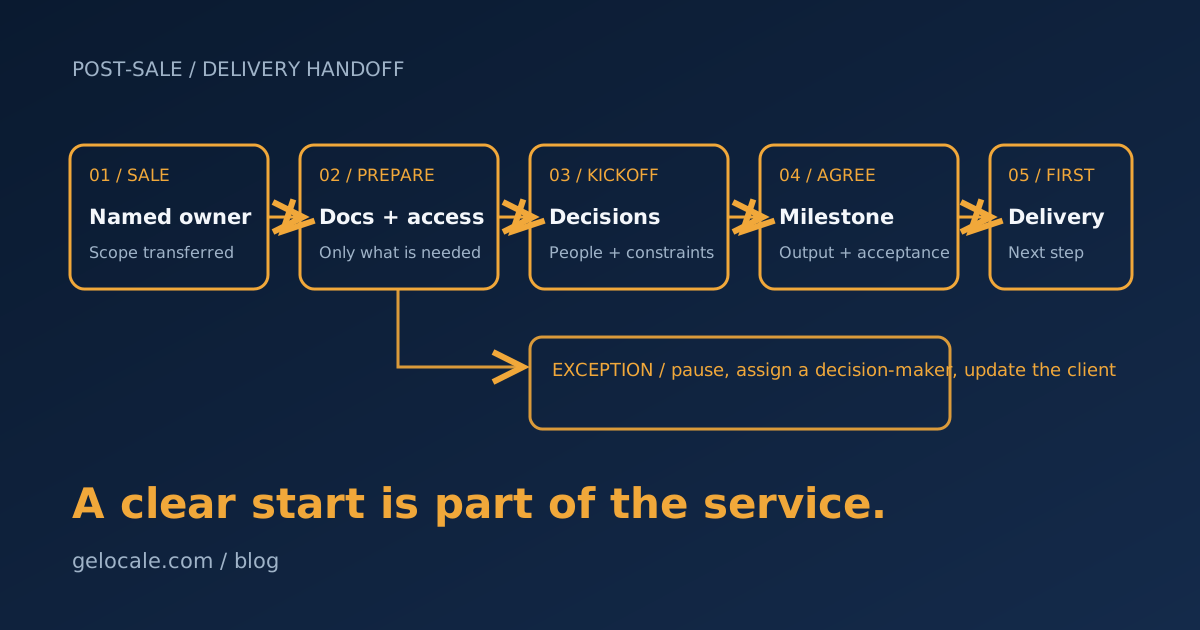
This is a post-sale operating checklist for service businesses. It is not a lead follow-up plan or a software shopping list. The goal is to make five things explicit: who owns the transition, what information is needed, how access is granted, what kickoff decides, and what the first milestone means.
Start the handoff when the sale is actually ready
Choose a clear trigger, such as an accepted agreement and confirmed initial payment if your terms require one. A verbal yes, a signed agreement, and a cleared deposit are different states. Write down which one allows delivery work to begin.
The person who closes the sale should pass a short, structured handoff to the delivery owner. Include:
- The service and scope sold, including agreed exclusions.
- The client’s goals and any commitments made during sales.
- Key contacts, preferred communication channel, and decision-maker.
- Dates or dependencies already discussed.
- Pricing or billing details the delivery team needs to know.
- Open questions and anything that does not fit the standard package.
The delivery owner should acknowledge the handoff and check it for gaps. Do not assume a CRM notification means another person has accepted responsibility. Until someone confirms ownership, the task is still unassigned.
For a practical checklist you can adapt, work through these stages in order.
Client onboarding checklist: five stages
1. Name one accountable owner
Assign one person to coordinate onboarding from the business side. That owner does not have to complete every task. They do need to know what is blocked, who is responsible, and when the client should hear from you.
Record the owner, backup contact, and next update date in the system your team actually checks. Tell the client who their main contact is and where to send questions. If the owner is away, define who covers the inbox; an auto-reply is not a handoff.
2. Request only the documents and access needed now
Send a short request grouped by purpose, with a reason and due date for each item. For example, a marketing engagement might need brand files, analytics access, and approval contacts. A bookkeeping engagement might need a different set. Do not collect a broad bundle “just in case.”
For each request, specify:
- What to provide, and an acceptable format or location.
- Who can provide or approve it.
- How to share it securely.
- Whether it is needed before kickoff or later.
- What happens if it is unavailable.
Ask for access through the platform’s invitation and permission controls when possible. Use the least access that lets your team perform the agreed work; avoid shared passwords and avoid putting credentials in ordinary email or a handoff note. Decide who removes access when the engagement ends. Security guidance from NIST and the OAIC is useful background, but the obligations that apply depend on your location, role, data, and contract. Get appropriate advice for regulated or sensitive work.
3. Confirm readiness and make the kickoff useful
Before the meeting, check that the right people are invited and that required items are either received or clearly marked as outstanding. Send a short agenda and ask the client to bring the person who can make decisions.
Use kickoff to settle the working agreement, not to read the proposal aloud:
- Confirm the outcome the client expects and the scope you accepted.
- Review responsibilities, communication channels, and response expectations.
- Check dependencies, access, approvals, and known constraints.
- Name unresolved questions and decide who will answer each one.
- Agree on the first milestone, its acceptance criteria, and the next update.
Write down decisions and owners while everyone is present. Send a concise recap with actions, responsible people, and dates afterward. If no decision-maker can attend, you can still introduce the process, but do not treat a consequential scope or priority decision as settled.
4. Route exceptions instead of hiding them
Standard checklists work until something differs. Define what should pause work and reach a person. Common examples include a mismatch between the signed scope and the sales notes, missing approval authority, a sensitive file sent through an unapproved channel, an access request that grants more permission than needed, or a client dependency that makes the promised date impossible.
Use a simple exception record: what happened, what decision is needed, who can decide, and whether work can safely continue. The owner should acknowledge the issue and tell the client what is waiting. Do not let an automation mark onboarding complete just because every field contains text; completeness is not the same as correctness or authorization.
If an exception changes scope, price, timing, or risk, get the appropriate approval and update the agreement or project record before proceeding. A checklist can surface the mismatch; it cannot make the decision for you.
5. Define and confirm the first milestone
“Get started” is not a milestone. Choose a first deliverable or decision that is visible to both sides and achievable with the information available. State:
- The output or decision the client will receive.
- What input or approval it depends on.
- Who prepares it and who reviews it.
- How the client will accept it or request a change.
- The next step after acceptance.
For example, a fictional design studio might define its first milestone as an approved direction board, dependent on receiving the logo files and one decision-maker’s feedback. That is clearer than “design begins.” If an input is late, revise the expected date with the client rather than silently treating the original plan as intact.
A compact handoff record
Keep one record that someone can scan without searching email threads:
| Field | What to record |
|---|---|
| Start trigger | The event that makes delivery work ready to begin |
| Accountable owner | Named person, backup, and next client update |
| Scope | Included work, exclusions, and commitments to confirm |
| Inputs and access | Requested, received, outstanding, and approved safely |
| Kickoff decisions | Contacts, constraints, decisions, and action owners |
| Exceptions | Issue, decision-maker, status, and client communication |
| First milestone | Output, acceptance criteria, dependencies, and next step |
Review a few completed onboardings periodically. Look for repeat blockers, requests that clients misunderstand, access that remains open too long, and handoffs that reach delivery without the promises made in sales. Track whether clients reach the agreed first milestone, how often work pauses for missing inputs, and which exceptions recur. Those observations tell you what to improve; a high checklist-completion rate alone does not.
Where automation fits—and where it does not
Automate predictable movement: create a project record after the agreed trigger, assign the named owner, send an approved request template, and remind the owner when an item is overdue. Keep decisions about scope, unusual data, access permissions, and client commitments with an accountable person.
If you are deciding which routine to automate, small business automation: what to automate first covers how to choose a suitable workflow. To find friction in the process you already have, use the 30-minute operations audit checklist. Onboarding benefits from automation only after the trigger, owner, and exception path are clear.
This checklist is a starting point, not a universal compliance or contract template. A business handling health, financial, children’s, or other sensitive information may need stricter access, retention, consent, and review controls. Match the process to your actual service, agreements, and jurisdiction.
If clients regularly reach kickoff without the right context—or work stalls after kickoff—bring your current handoff and onboarding steps to a Growth Systems Review. We can map ownership, exceptions, and the first milestone before deciding what, if anything, to automate.
Sources
- NIST: Cybersecurity Framework 2.0 Small Business Quick-Start Guide — small-business cybersecurity risk-management guidance.
- OAIC: Australian Privacy Principle 11—Security of personal information — Australian privacy guidance on protecting personal information.