
Proposal follow-up email: three useful messages for service businesses
A practical proposal follow-up email plan for service businesses: who owns it, when to send three distinct messages, and how to stop as soon as the prospect replies.
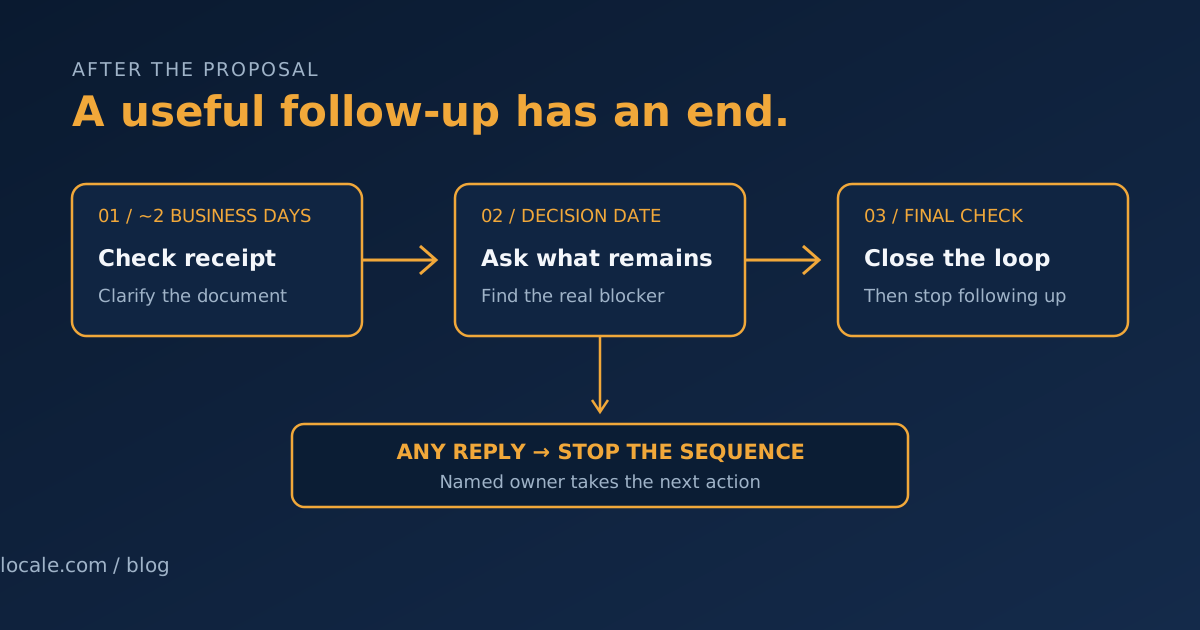
The quote is out. You explained the work, answered the first questions, and then the inbox went quiet. A useful proposal follow up email does not nag someone into buying. It makes the next decision easier, gives them room to say what is holding things up, and tells your team when to stop.
This is a different job from responding quickly to a brand-new inquiry. Speed-to-lead follow-up covers that first response. Here, the prospect has already discussed the work and received a proposal. The job now is to move that specific decision forward without treating silence as permission for an endless sequence.
Choose an owner and a clock before sending the proposal
When the proposal goes out, put three things in the CRM or task list:
- One named owner. Usually the person who scoped the work and can answer questions about it. A shared inbox is not an owner.
- A relevant next date. Ask the prospect when they expect to review it. If they give you a date, use that. If they do not, set a modest check-in rather than inventing urgency.
- A stop rule. Any human reply stops the scheduled follow-ups. The owner takes over and records the next action.
For a straightforward service proposal with no agreed decision date, a workable starting cadence is a receipt check after about two business days, a decision-oriented note around five to seven business days after sending, and one close-the-loop message several business days later. Those are starting points, not universal benchmarks. A procurement process, seasonal project, or client who says “come back next month” needs dates that fit their process.
Tell the prospect what to expect when you send the proposal: “I’ll check that it arrived on Thursday, then follow up once next week if you haven’t had a chance to review it.” A simple expectation makes the later email feel like a continuation of the conversation, not a surprise campaign.
Three proposal follow-up emails you can adapt
Replace the brackets with true details. Keep one question per message. Do not claim a deadline, slot, price hold, or discount unless it is real and relevant.
1. Check that the proposal arrived
When: About two business days after sending, unless the prospect has already set another review date.
Purpose: Catch a delivery problem or unclear scope before asking for a decision.
Subject: Did the [project] proposal come through?
Hi [Name],
I sent the proposal for [specific project] on [day]. Did it come through okay?
If useful, I can clarify the section on [scope, timing, or pricing]. Is there anything in the document that is unclear?
Best,
[Owner]
This is not “just bumping this to the top of your inbox.” It refers to the actual proposal and offers a useful next step. If the document has a genuine expiry date, state it plainly; do not manufacture one to force a reply.
2. Ask what decision remains
When: At the prospect’s stated review date, or roughly five to seven business days after sending if no date was agreed.
Purpose: Surface a specific blocker or confirm that they are still evaluating.
Subject: What would help with the [project] decision?
Hi [Name],
I wanted to check in now that you’ve had a little time with the proposal. Is the main open question the scope, the timing, or something else?
If the plan is close but one part does not fit, tell me which part and I can let you know whether there’s a sensible adjustment. If priorities have changed, that’s useful to know too.
Best,
[Owner]
Do not offer an automatic discount just to provoke a response. If there is a genuine alternative—such as a smaller first phase—describe its trade-off accurately and let the owner confirm it is deliverable.
3. Close the loop without creating false urgency
When: Several business days after the second note, or on the next date the prospect asked you to use. Send this only if there has been no reply and no active conversation.
Purpose: Make it easy to say “later” or “not proceeding,” then stop chasing.
Subject: Should I close the loop on [project]?
Hi [Name],
I haven’t heard back, so I’ll close my follow-up on the [project] proposal for now. If you’re still considering it, reply with the timing that works and I’ll pick it up with you. If the project is no longer a fit, no explanation is needed.
Best,
[Owner]
After this, mark the proposal no response / follow-up closed and stop the sequence. Do not keep sending “checking in” emails every few weeks. A later re-open should have a reason—such as the prospect asking you to reconnect—not just a date on an automation calendar.
The reply rule: stop first, interpret second
Configure the sequence so any reply suppresses every remaining automated follow-up. Do not wait for the message to contain words like “interested” or “yes.” A reply may be an objection, a request for time, a correction, a referral to another decision-maker, or a clear no. Each needs a human response, not another scheduled nudge.
The owner should then record a next step:
- Question or objection: answer it, and set a reminder only if a further check-in is agreed.
- “Not until [date]”: pause the sales chase and create one task for that date.
- Not proceeding: close the opportunity and end proposal follow-up.
- Out-of-office notice: suppress the next message and set a review for the stated return date if appropriate; do not treat the auto-reply as a conversation.
- No response: continue only through the finite cadence above, then close the loop.
Test the stop condition before turning automation on. Replies can arrive from a different address, through a connected inbox, or while the proposal owner is away. Make sure the CRM task has a backup owner for absences, and confirm the sequence still stops when the reply is logged manually. A missed stop is worse than a slightly late reminder.
If you automate the timing, use the tool to schedule and create tasks—not to impersonate a personal conversation. HubSpot’s documentation, for example, describes sequences as timed templated emails and task reminders; whatever system you use, verify its actual reply-detection and stop behavior before relying on it.
Measure decisions, not sends
Review a small set of outcomes by proposal: did the prospect reply, what was the next step, did the proposal proceed or close, and how long did the decision take? Also check for missed replies, duplicate messages, and proposals left open after the final note. “Emails sent” is an activity count, not proof that the process is helping.
If a number is useful, compare the share of proposals that receive a meaningful reply within the agreed follow-up window before and after changing the process. Keep the proposal type and measurement window consistent. A small number of proposals can swing dramatically, so treat early results as a signal to inspect—not proof that a template caused a sale.
This process is not right for every proposal. A high-value or sensitive engagement may call for a scheduled conversation instead of automated email. An urgent safety issue, complaint, or change to commercial terms belongs with a person. And a proposal the prospect has explicitly declined should not remain in a nurture sequence.
If you also want to improve how inquiries are captured and handed to the right person before a proposal exists, see AI lead generation for service businesses. For help mapping the owner, timing, reply handling, and close-out steps in your own workflow, bring it to a Growth Systems Review.
Sources
- Federal Trade Commission: CAN-SPAM Act compliance guide for business — US guidance on commercial email obligations; the rules applicable to a specific message depend on its content and circumstances.
- HubSpot Knowledge Base: Create and edit sequences — product documentation for timed email and task sequences. Features differ by system; confirm reply-stop behavior in your own setup.