
Simple standard operating procedure template for small teams
Copy a simple standard operating procedure template with an owner, ordered steps, exceptions, and completion checks. Includes a worked service-team example.
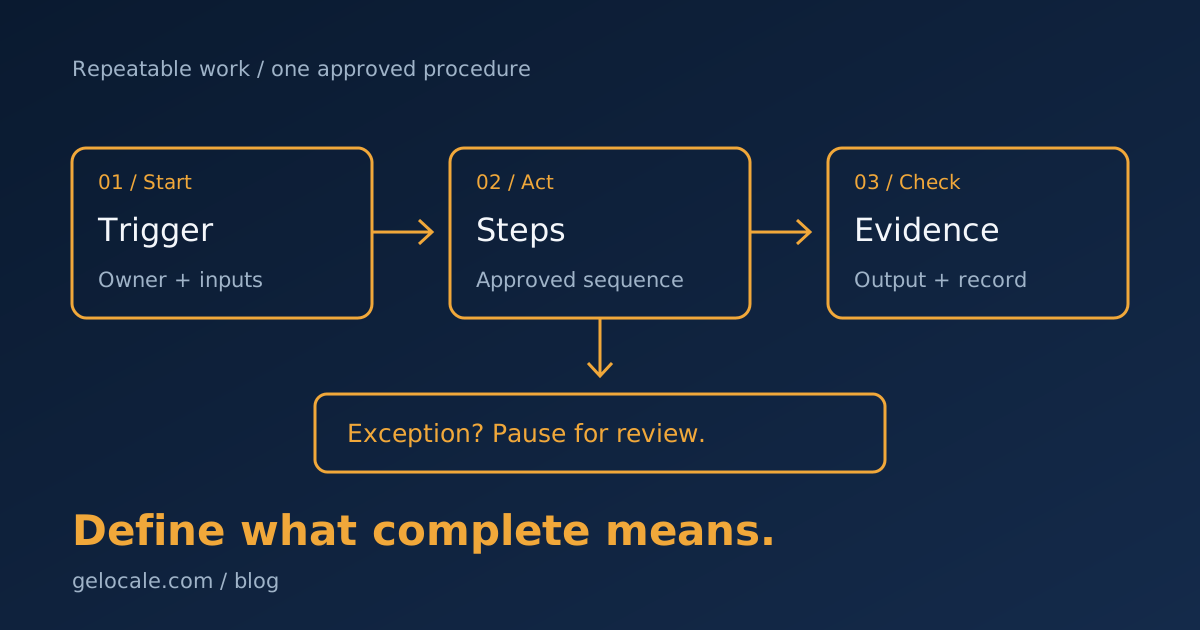
A simple standard operating procedure template records how your team completes one repeatable task. Include the trigger, owner, inputs, steps, exceptions, and completion check.
Start with a routine someone already performs. Write down the real sequence, then ask another person to follow it without extra instructions.
The template below suits everyday service-business operations, such as preparing a weekly client update. Regulated, clinical, or safety-critical work needs its own approved procedures.
A simple standard operating procedure template you can copy
Copy this table into your working document. Replace the brackets with details for one task, rather than describing your whole business.
| Field | Fill in |
|---|---|
| Procedure name | [Task and expected output] |
| Purpose | [Why the task matters] |
| Scope | [When this procedure applies and what it excludes] |
| Trigger | [Event or schedule that starts the task] |
| Owner and backup | [Who completes the task and who covers absences] |
| Required inputs | [Information, files, and approvals needed before starting] |
| Tools and permissions | [Approved locations and minimum access needed] |
| Steps | [Actions in order, with a check after each important action] |
| Exceptions | [When to pause and who decides what happens next] |
| Completion evidence | [Output and record proving the task is finished] |
| Timing | [Deadline, timezone, and what happens if work runs late] |
| Review | [Approver, version, review date, and approved storage location] |
Under the steps field, use this short pattern:
- Check [required input]. If missing, assign [owner] to resolve it.
- Complete [action] using [approved tool or location].
- Check [result] against [specific acceptance rule].
- Save [evidence] in [record]. Notify [next owner] if a handoff is needed.
Replace each bracket before using the procedure. “Check the report” leaves too much open unless you name what the reviewer should check.
A useful completion rule might require the reporting period, client name, totals, and unresolved questions to match the project record.
The EPA's 2007 SOP guidance supports concise steps, informed review, and version control. It was written for quality activities, not as a certification template for service firms.
Choose one task with a clear finish
Good starting tasks produce something a second person can check. Preparing a client update, assigning a support request, or reviewing an invoice fits this approach.
“Manage clients” is too broad. “Prepare and send the approved weekly project update” has a clear trigger, output, and completion record.
Walk through a recent example with the person doing the work. Note which inputs they used, which decisions they made, and where they paused.
Ask about exceptions before writing the clean version. A procedure based only on successful cases leaves the team guessing when information is missing.
Keep the document close to the task. Link it from the project template or recurring task so people do not need to search for it.
If you cannot identify the task's owner or finish, settle those decisions first. A document cannot resolve unclear responsibility.
The 30-minute operations audit helps you identify a routine worth documenting before you add more detail.
A completed example for a weekly client update
This example is fictional. It shows a filled-in procedure for a small design team, not an observed client result.
| Field | Example |
|---|---|
| Procedure name | Prepare the weekly website project update |
| Purpose | Give the client a checked account of progress and decisions needed |
| Scope | Active website projects, excluding billing disputes and contract changes |
| Trigger | Thursday morning before the agreed Friday update |
| Owner and backup | Project coordinator, with the delivery lead as backup |
| Inputs | Current task board, approved milestones, and open client decisions |
| Tools | Project board and approved client email template |
| Completion evidence | Approved message, sent timestamp, and next actions saved in the project |
| Timing | Send by the agreed Friday deadline in the client's recorded timezone |
| Review | Delivery lead approves date changes and unresolved delivery risks |
The coordinator follows these steps:
- Check completed tasks against their approval records.
- Compare the next milestone with the current delivery plan.
- List the decisions the client needs to make, with owners and dates.
- Draft the update using confirmed details.
- Ask the delivery lead to review changed dates or unresolved risks.
- Send the approved update and save the message in the project.
An unfinished design is not recorded as complete because someone uploaded a file. The coordinator checks the agreed acceptance record.
If the next milestone is uncertain, they flag the issue for the delivery lead. They do not invent a new date to finish the email.
The exception stays open until the lead records a decision. Other confirmed progress still appears in the update.
Make exceptions part of the procedure
Name the cases that stop the normal sequence. Examples include missing approval, conflicting records, excess access, or a change outside the agreed scope.
For each case, record the question, decision-maker, deadline, and work allowed to continue. Give the reviewer enough context to act.
Avoid a catch-all instruction such as “Ask the manager.” Name the role responsible for the decision and the backup if that person is unavailable.
Separate permission from responsibility. Access to a shared folder does not authorize someone to change a client's delivery promise.
If the same exception keeps returning, revise the input rule or approval step. Repeated workarounds indicate a gap in the procedure.
Test the document with another person
Choose a representative task with suitable permissions. Ask a colleague to follow the procedure using the approved inputs.
Record every point where they need an explanation. Add the missing rule, link, or example rather than blaming them for not knowing the background.
Then test one exception. Remove a required approval or supply conflicting dates and check whether the colleague pauses at the correct step.
Compare the finished output with the acceptance rule. A completed checklist does not prove the result is suitable.
EPA guidance distinguishes the procedure from its checklist. The procedure explains the work, while the checklist records whether required actions happened.
Keep both short enough to use. Add screenshots only when they explain a step, and update them when the interface changes.
Keep one approved version
Record the owner, approval date, and version on the document. Put the approved copy in one known location.
Replace obsolete links in task templates. Keep older versions separately where needed, clearly marked so people do not use them for current work.
Review the procedure when tools, responsibilities, inputs, or client terms change. A calendar review also helps catch quiet changes.
Track missed inputs, repeated questions, rework, and exceptions by task. Look for the step responsible, rather than measuring document views alone.
Once people follow the procedure consistently, consider which routine actions to automate. Keep approvals and uncertain cases with the appropriate person.
The guide to choosing what to automate first covers that separate decision.
If a repeat task depends on unwritten instructions, bring one example to a Growth Systems Review. We can examine its inputs, ownership, and checks.